
Curriculum
Updated Technology Usage Guidelines for 2026-2027
At all levels, the use of technology in the classroom must be intentional and directly aligned with the curriculum and learning goals/targets. The goal is to ensure technology serves as a meaningful tool for academic growth. To support this, Chromebooks are reserved for educational purposes and should not be used for rewards, during lunch, for indoor recess, for soft starts, or for free choice activities.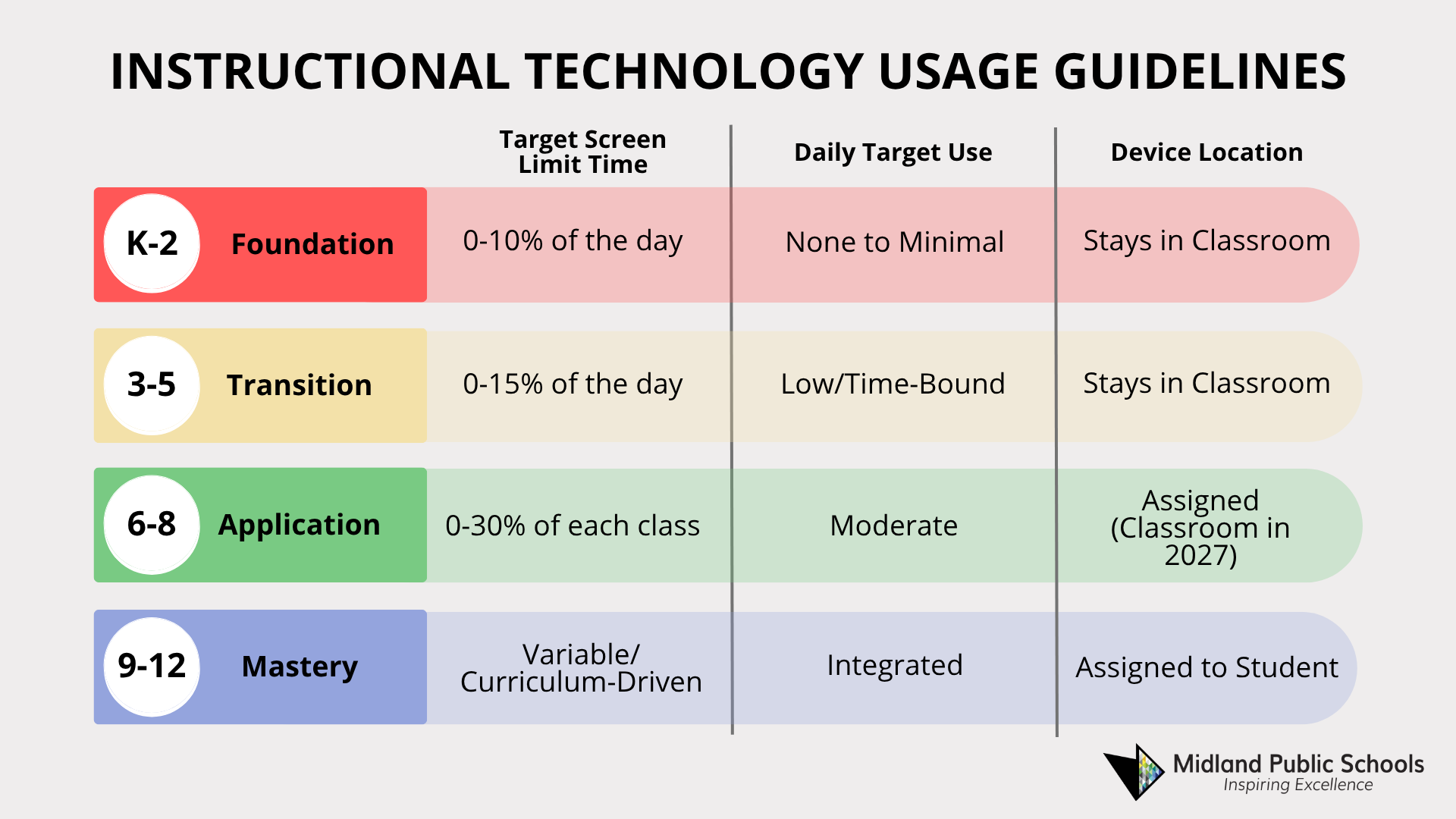
Level 1: K-2 (The Foundation)
Guidelines: Play-based intention, tactile, and social-emotional learning. Technology is a tool for administrative necessity, not a primary learning medium.
- Daily Use: None to Minimal. Instruction is delivered via physical manipulatives, hands-on learning, and face-to-face interaction.
- Digital Literacy: Common Sense Media’s Digital Citizenship Curriculum is administered to all K-2 students.
- Canvas/Clever Integration: Teachers use Canvas and Clever portals, but students sign in only occasionally, when needed.
- Permitted Tech Use:
1. Standardized Testing: Brief introductory sessions to familiarize students with device navigation (scrolling, clicking) prior to state-mandated assessments.
2. Assistive Tech: Used as required by IEP/504 plans or when needed. - Screen Time Use: 0-10% of instructional time (excluding required testing).
- Device Management: Devices are to stay in the classroom.
Level 2: Grades 3-5 (The Transition)
Guidelines: Purposeful introduction. Technology is used as a "supplemental tool" and a bridge to digital literacy.
- Daily Use: Low. Tech is used for specific, time-bound tasks (e.g., 20 minutes of research or an online activity).
- Digital Literacy: Common Sense Media’s Digital Citizenship Curriculum is administered to all students in grades 3-5.
- Canvas/Clever Integration: Introduced in Grade 3 and gradually increased. Students learn to locate assignments and activities and occasionally submit digital work to prepare for middle school workflows.
- Permitted Tech Use:
1. Research: Guided internet searches for projects.
2. Assessment: Practice for online testing environments.
3. Creative Production: Introduction to basic word processing.
4. Assistive Tech: Used as required by IEP/504 plans or when needed. - Screen Time Use: 0-15% of the instructional day (excluding required testing).
- Device Management: Devices are to stay in the classroom.
Level 3: Grades 6-8 (The Application)
Guidelines: Technology as a functional tool. Students focus on digital citizenship, organization, and moderate technology use in a classroom setting.
- Daily Use: Moderate. Devices are used for core academic functions, but are put away when possible during collaborative discussions and work time.
- Digital Literacy: Common Sense Media’s Digital Citizenship Curriculum is administered to all 6th-grade students.
- Canvas/Clever Integration: Active. Canvas is the primary "hub" for the classroom. Students check it daily for announcements, assignments, notes, assessments, and to submit their work digitally when directed.
- Permitted Tech Use:
1. Collaboration: Google Workspace and other applications.
2. Subject-Specific Tools: Digital curricula, approved digital programs, graphing calculators, etc.
3. Assistive Tech: Used as required by IEP/504 plans or when needed. - Screen Time Goal: 0-30% of the instructional hour.
- Device Management: Devices are assigned to students for the 2026-27 school year and are to remain in the classroom starting with the 2027-28 school year.
Level 4: Grades 9-12 (The Mastery)
Guidelines: Professional preparation. Students exercise agency in choosing the right tool for the task, mimicking college and career environments.
- Daily Use: Higher. Technology is integrated into the workflow of most subjects.
- Digital Literacy: Lessons from Common Sense Media’s Digital Citizenship Curriculum are administered to all students during Advisory time.
- Canvas/Clever Integration: Full. The course is managed entirely through Canvas (lectures, quizzes, peer reviews, and grade tracking).
- Permitted Tech Use:
1. Professional Suites: Advanced use of data analysis, design, and programming software.
2. Hybrid Learning: Participation in blended learning models and online collaboration.
3. Assistive Tech: Used as required by IEP/504 plans or when needed. - Screen Time Goal: Variable; driven by curriculum and teacher requirements.
- Device Management: Devices are assigned to students.
Philosophy on Gaming and Gamified Learning
The use of technology for recreational gaming is strictly prohibited during instructional hours. Digital tools are provided solely for academic advancement. Gamified learning is permitted only when it directly aligns with curriculum standards at the teacher’s discretion. Gamified learning may use points, badges, leaderboards, characters, and other elements to achieve learning objectives. These tools must be vetted by the district to ensure they prioritize pedagogy over play.
District Approved Computer Skills Curriculum
Throughout the work group, there was evidence of a desire to implement a district-wide computer skills curriculum (typing, email, word processing, digital literacy, etc.) to combat the need for subject areas to incorporate technology into their pedagogy.
Policy Review and Updates
The District will continue to monitor this guidance and will modify these guidelines as needed.
Elementary Curriculum
The elementary curriculum handbooks provide parents with grade level information about the Midland Public School's (K-5) curriculum. The elementary curriculum was developed using the Michigan Academic Standards. An explanation of the International Baccalaureate Primary Years Programme (PYP) is part of the handbook, along with information to guide parents in the understanding of quarterly report cards. Please refer to the handbooks throughout the school year if you have questions regarding the PYP, curriculum, or grade level expectations. If you have questions that are not answered in the handbook, please contact your child’s classroom teacher.
Middle School Curriculum
Middle School Course Selection Sheets
Fifth Grade Transition - Pathways to Middle School Success
Secondary (6-12) Course Offering Guide
High School Curriculum
Graduation requirements, course descriptions, and career pathways are available in our comprehensive Course Offering Guide document.
International Baccalaureate The IB Diploma Programme is an academically challenging and balanced programme of education that prepares students for successes at university and life beyond. Students can recover and protect high school credits with this online program. MPS Testing Guides.
Testing Confused by the M-STEP, ACT, PSAT, SAT and MME? Visit our guide to standardized tests below.
Course Pathways
Each curricular area has developed a document that shows the options for course selection that would lead to a student completing a program sequence. Some sequences are required for graduation, others may be electives. These course pathway documents facilitate planning.
Post Graduation Opportunities
Looking to explore in-demand careers and discover the degrees or credentials needed to pursue them? Use Pathfinder, Michigan’s online career exploration tool that uses current information related to employment and the workforce and data about the relationship between education and training programs to help you learn about career paths and jobs in the state.
Building Handbooks
Building handbooks are also available on individual building websites.